
Mitsubishi Electric Wi-Fi air conditioning controllers bring smart, efficient climate management to home and commercial spaces, offering seamless control of heating and cooling systems via smartphone, tablet, or online account. Designed for optimal convenience and higher energy efficiency, these controllers ensure precise temperature regulation and comfort across various commercial environments.
Need help choosing?
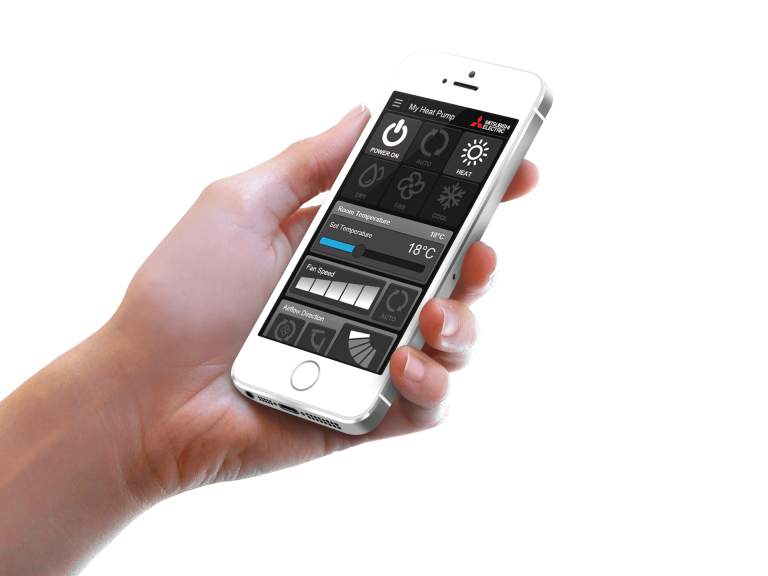
Wi-Fi Control unlocks the door to smarter heating and cooling, for total home comfort wherever you are.
This innovative technology connects your Mitsubishi Electric air conditioner to your smartphone, tablet or online account, giving you the freedom to fully control each unit on-the-go via an Internet connection from anywhere in the world.
Optional Wi-Fi adapter required per unit, unless built-in. Excludes models AP25-80, EF, KW & LN.
Requires an Internet connection and the Wi-Fi Control App downloaded from the App Store or Google Play Store on your smartphone or tablet with the latest Operating System available.
Whether for homes or businesses, managing air conditioning efficiently improves comfort and running costs. Mitsubishi Electric Wi-Fi air conditioning controllers give you precise control over your indoor temperatures, letting you adjust settings and monitor performance from anywhere. This remote access helps both families and businesses maintain comfortable spaces while effectively managing energy use.
Mitsubishi Electric Wi-Fi air conditioning controllers help manage indoor comfort efficiently across different spaces. The MAC-588IF-E Wi-Fi adaptor and Wi-Fi Control software/account lets you set minimum and maximum temperature limits to maintain consistent conditions. By creating and enabling rules in the Wi-Fi Control app, you can set the system to automatically provide heating or cooling when temperatures move outside your chosen range. This helps protect sensitive areas in homes, such as nurseries and maintains productive temperatures in office environments.
The Wi-Fi control can be set so your air conditioner only operates when needed. When room temperatures exceed your set limits, the system adjusts the temperature automatically and turns off once the desired temperature is reached – all managed by your activated rules in the app.
Creating custom operating schedules based on your routine and occupancy patterns helps reduce energy use while keeping temperatures comfortable throughout the day and all summer and winter. This practical approach works well for both family homes and business premises, offering straightforward control over your indoor comfort year-round.
The Mitsubishi Electric MAC-588IF-E Wi-Fi controller offers centralised control for multiple air conditioning units, compatible with the M Series, P Series, and CITY MULTI indoor units manufactured post-January 2015. To manage different air conditioning units independently, optional Wi-Fi adapters are required for each indoor unit, except for the MSZ-LN series, which features built-in Wi-Fi capability. To further enhance this centralised control, voice control technologies like Amazon Alexa*2 and Google Assistant*3 can be incorporated with air conditioners that are connected with Wi-Fi Control*1. This feature allows for effortless, hands-free operation, making it simpler to remotely control and adjust settings across multiple units.
*1 Optional Wi-Fi adapter required per unit (excludes LN Series due to built-in capabilities).
Requires an Internet connection and the App downloaded from the App Store or Google Play Store on your smartphone or tablet with the latest Operating System available.
*2 To use Amazon Alexa to control your air conditioner, you will need an Amazon Alexa Echo device.
*3 To use Google Assistant to control your air conditioner, you will need a Google Home smart speaker.
Mitsubishi Electric designs air conditioning systems that improve comfort while helping reduce energy use in homes and businesses. With more than 50 years of experience in Australia, we continue to develop reliable climate control solutions that meet our customers’ changing needs.
Explore our other types of air conditioning controllers below.
The CSA Statement of Compliance provides access to our compliance statements under the requirements of the Cyber Security Act 2024 (Cth) and the Australian Government’s Cyber Security (Security Standards for Smart Devices) Rules 2025 for applicable products.
The MAC-588IF-E Wi-Fi controller is compatible with Mitsubishi Electric air conditioning systems manufactured after January 2015, including the M Series, P Series, and CITY MULTI indoor units.
Each indoor unit needs an optional Wi-Fi adapter to use the Mitsubishi Electric Wi-Fi controller, except for the MSZ-LN series, which features built-in Wi-Fi capabilities. This adapter enables connection to the Wi-Fi Control App, enhancing your ability to manage your air conditioning system. Additionally, accessing this feature requires an Internet connection and downloading the Wi-Fi Control App from the App Store or Google Play Store onto a smartphone or tablet with the latest operating system.
The Wi-Fi controller contributes to energy efficiency by allowing you to set precise temperature controls, operating rules for smarter heating and cooling, and schedules that align with your commercial space’s occupancy and usage patterns. This smart air management helps reduce unnecessary energy consumption, helping you to optimise your energy usage.
Integrating Amazon Alexa or Google Assistant with the Wi-Fi controller allows for hands-free voice control of your air conditioning system. This convenient feature means you can adjust settings, turn units on or off, and manage the climate of your space without interrupting your activities, enhancing both convenience and comfort.
To connect your Wi-Fi controller to Amazon Alexa, follow these steps:
Connecting your Wi-Fi Controller to Google Assistant involves a few simple steps: